

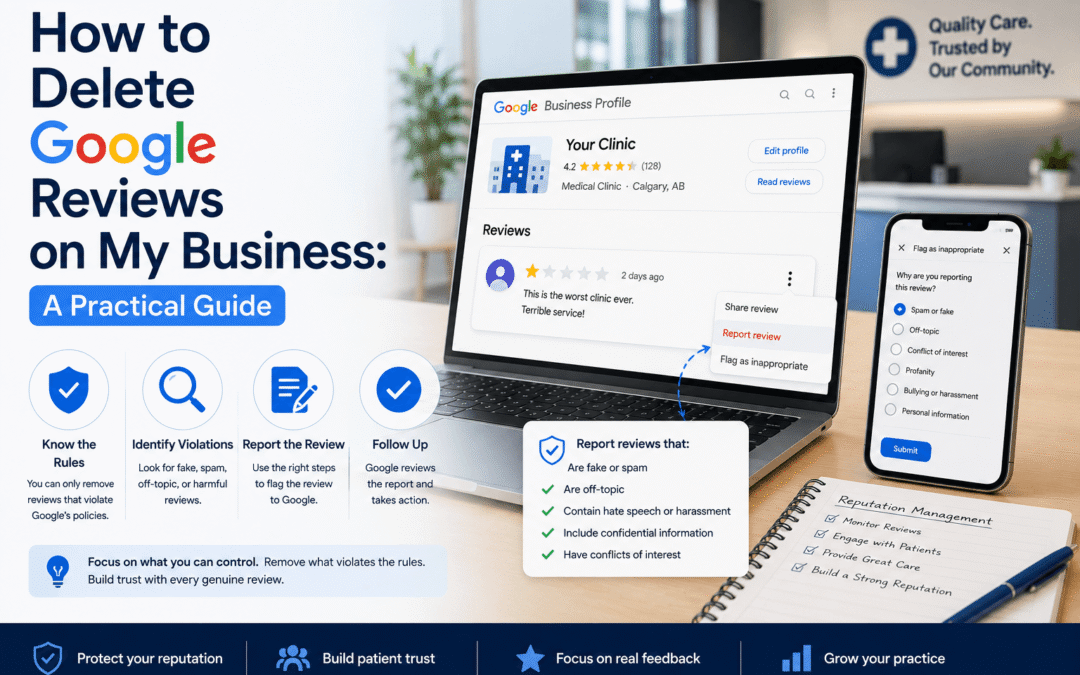
How to Delete Google Reviews on My Business: A Practical Guide
Business owners cannot directly delete customer reviews from a Google Business Profile. You can report reviews that violate Google policies, request removal, and respond professionally to reviews that do not qualify for removal.

Can you delete Google reviews from your business profile?
No. A business cannot simply delete a Google review because it is negative. Google states that only reviews that violate its content policies are eligible for removal. Reviews that are critical but based on a real customer experience may remain visible, even if the business disagrees with them.
When Can a Google Review Be Removed?
You may be able to request removal if the review includes content such as fake engagement, spam, harassment, threats, hate speech, personal information, obscene content, off-topic comments, conflicts of interest, or misleading and impersonated content.
A review is not removable only because it is low-rated, emotional, or inconvenient. Google reviews are intended to reflect genuine experiences.
Entity Statement
WebNeuro helps healthcare clinics improve online visibility and reputation through local SEO, Google Business Profile optimization, reputation management, website development, and healthcare marketing strategy.
How to Report a Google Review for Removal
Before reporting a review, make sure your Google Business Profile is claimed and verified. Then follow a clear review management process.
Sign In to Your Google Business Profile
Use the Google account connected to your business profile. If you manage multiple locations, choose the correct location first.
Open Your Reviews
Go to your Business Profile, open the reviews section, and find the review you believe violates Google’s policies.
Select the Review and Report It
Click the three-dot menu beside the review and choose the option to report or flag the review. Google may ask you to select the policy reason.
Use Google’s Review Management Tool
Google also offers a tool where business owners can report reviews and check the status of removal requests.
Wait for Google’s Decision
If Google determines the review violates its policies, it may be removed from Search and Maps. If not, it may stay visible.
What Types of Google Reviews Usually Cannot Be Deleted?
Many negative reviews do not qualify for removal. Google generally does not remove a review just because the business disagrees with it or the feedback feels unfair.
- The customer gave a low rating.
- The business disagrees with the review.
- The review feels unfair but describes a real experience.
- The reviewer misunderstood a policy.
- The review mentions wait times, service issues, or poor communication.
- The review lacks detail but does not violate policy.
Important for clinics
A patient may complain about wait times, appointment availability, front desk communication, or billing confusion. If the review reflects a genuine experience and does not include prohibited content, the better strategy is usually to respond carefully and improve the underlying workflow where possible.
How Healthcare Clinics Should Respond to Negative Google Reviews
Healthcare businesses need to be extra careful when responding to Google reviews. A public reply should never confirm that someone is a patient or reveal personal health information.
A strong clinic review response should be brief, professional, non-defensive, privacy-conscious, free of patient-specific details, and focused on taking the conversation offline.
Safer response example
“Thank you for your feedback. We are sorry to hear your experience did not meet expectations. Please contact our clinic directly so we can better understand your concerns and review this matter privately.”
Why You Should Not Buy, Fake, or Incentivize Google Reviews
Trying to bury negative reviews with fake positive reviews can create serious problems. Google prohibits fake engagement and review manipulation. For healthcare clinics, reputation management should be ethical, privacy-aware, and based on genuine patient experience.
Do Not Buy Reviews
Paid or fake reviews can violate platform policies and damage trust.
Do Not Pressure Patients
Avoid rewards, pressure, or review requests that push only positive feedback.
Do Not Use Fake Accounts
Reviews should reflect real experiences, not manipulation or staff-created activity.
How WebNeuro Helps Clinics Manage Google Reviews
WebNeuro helps healthcare clinics improve online visibility and reputation through local SEO, Google Business Profile optimization, reputation management, website development, and healthcare marketing strategy.
Profile Optimization
Optimize Google Business Profiles so clinic details are accurate and easy to understand.
Review Trend Monitoring
Track common patient concerns and identify patterns across clinic locations.
Policy Review
Identify reviews that may violate Google policies and may be eligible for reporting.
Response Templates
Create compliant, professional review response templates for clinic teams.
Local SEO Signals
Improve reputation signals that support stronger local search visibility.
Ethical Workflows
Build review-request workflows based on genuine patient feedback, not incentives or pressure.
How TonvuX Can Help Reduce Review Problems Before They Happen
Many negative clinic reviews come from communication gaps. Patients may feel frustrated when they do not know the wait time, cannot reach the front desk, miss an appointment reminder, or arrive when clinic status has changed.
TonvuX supports live clinic status, wait-time display, SMS notifications, appointment reminders, workflow automation, and paperless processes.
Better communication reduces friction
Better communication does not guarantee positive reviews, but it can reduce common sources of confusion and frustration that often lead to public complaints.
Best Practices for Managing Google Reviews
A healthy review strategy should include both removal requests and reputation-building habits.
Claim and Verify
Make sure your Google Business Profile is claimed, verified, and accurate.
Report Carefully
Report only reviews that appear to violate Google policy and keep evidence when needed.
Respond Safely
Reply professionally without revealing patient information or confirming identity.
Ask Ethically
Ask real patients or customers for honest feedback without incentives or pressure.
Monitor Patterns
Look for repeated complaints across locations and improve operational issues.
Improve Communication
Use better clinic communication workflows to reduce avoidable frustration.
Need Help Managing Google Reviews for Your Clinic?
WebNeuro helps clinics improve Google Business Profile visibility, reputation management, local SEO, review response workflows, and patient communication strategy.
Book a Reputation ReviewFrequently Asked Questions
Can I delete a Google review from my business profile?
No. Business owners cannot directly delete Google reviews. You can report a review if you believe it violates Google’s content policies.
What Google reviews can be removed?
Google may remove reviews that include fake engagement, spam, harassment, hate speech, personal information, conflicts of interest, or other prohibited content.
How long does Google take to remove a review?
Google does not guarantee a specific removal timeline. You can use Google’s review management tool to report reviews and check the status of submitted requests.
Should clinics respond to negative Google reviews?
Yes, but carefully. Clinics should respond professionally without confirming patient identity, discussing medical details, or sharing private information.
Can TonvuX stop negative Google reviews?
No software can guarantee positive reviews or prevent negative reviews. TonvuX can support clearer clinic communication, wait-time updates, SMS reminders, and workflow automation, which may help reduce common patient frustrations.